Mixpanel vs Amplitude for Small Budget Teams
Compare Mixpanel vs Amplitude for small budget teams. We review free tier limits, pricing gotchas, and dashboard setup for bootstrapped SaaS founders.

Mixpanel vs Amplitude for Small Budget Workflows
Mixpanel edges out Amplitude for teams with tight funds due to simpler event pricing and lower setup demands. Choosing Mixpanel vs Amplitude for small budget projects comes down to how much data engineering you can afford. Mixpanel offers generous core tracking out of the box, whereas Amplitude provides deeper path analysis once your data pipeline matures.
Quick verdict
Mixpanel wins for early-stage teams wanting predictable tracking, while Amplitude wins on raw free volume. When weighing mixpanel vs amplitude for small budget teams, Amplitude provides a generous starting tier of 2 million events per month. Mixpanel uses an event-based pricing structure with Free, Growth, and Enterprise tiers without requiring a trial.
Mixpanel also excludes identity updates, profile creations, session records, and alias calls from billing calculations. For growing setups tracking complex account interactions, add-ons like Group Analytics or Data Pipelines are available as needs expand.
How We Evaluated Both Analytics Platforms
We analyzed documentation and product architectures rather than running internal benchmarks. Evaluating Mixpanel vs Amplitude for small budget teams requires understanding how daily reporting and maintenance differ under lean resources. Just as store owners weigh Rebuy vs Bold Subscriptions to sustain recurring revenue, product teams need tools that do not drain engineering hours.
Mixpanel tracks user interactions using three core concepts: events, users, and properties. Amplitude allows product teams to build funnels, retention charts, segmentation charts, and dashboards without writing SQL. For schema maintenance, Amplitude supports data governance workflows by enforcing schema rules upon event ingestion.
Mixpanel vs Amplitude Feature Comparison
Early-stage teams evaluating mixpanel vs amplitude for small budget needs must weigh event volume allowances against reporting flexibility. Both platforms let you analyze user journeys without SQL, but their packaging rules differ.
Scroll the table →
Feature / Attribute
Mixpanel
Amplitude
Free tier event allowance
Monthly allowance without trial periods; user profile updates and identity calls are excluded from billing
2 million events per month
Dashboard building and reports
Unlimited saved reports on the free plan
Funnels, retention charts, segmentation, and dashboards without SQL
Data governance and schema
Available primarily through paid enterprise tiers and structured add-ons
Enforces schema rules directly upon event ingestion
Plan structure
Free, Growth, and Enterprise event-based tiers with optional paid add-ons
Free plan with tiered expansion options and automated Global Agent support
Free Tier Allowances: Sustaining Weekly Reviews on a Lean Budget
When choosing mixpanel vs amplitude for small budget teams, Amplitude provides a clearly stated volume baseline. It offers 2 million events per month on its free plan, allowing early teams to run routine checks without an immediate paywall.
Amplitude includes 2 million events per month on its free tier. Mixpanel also structures its platform around Free, Growth, and Enterprise tiers, granting unlimited saved reports alongside a monthly event limit without requiring a trial.
Mixpanel helps preserve event capacity by excluding identity calls and profile updates from monthly billing. Actions like $identify, $create_alias, and $mp_session_record do not count toward usage totals. You can explore how these limits scale across analytics tools on our comparison hub.
Governance Overhead and Non-Technical Usability
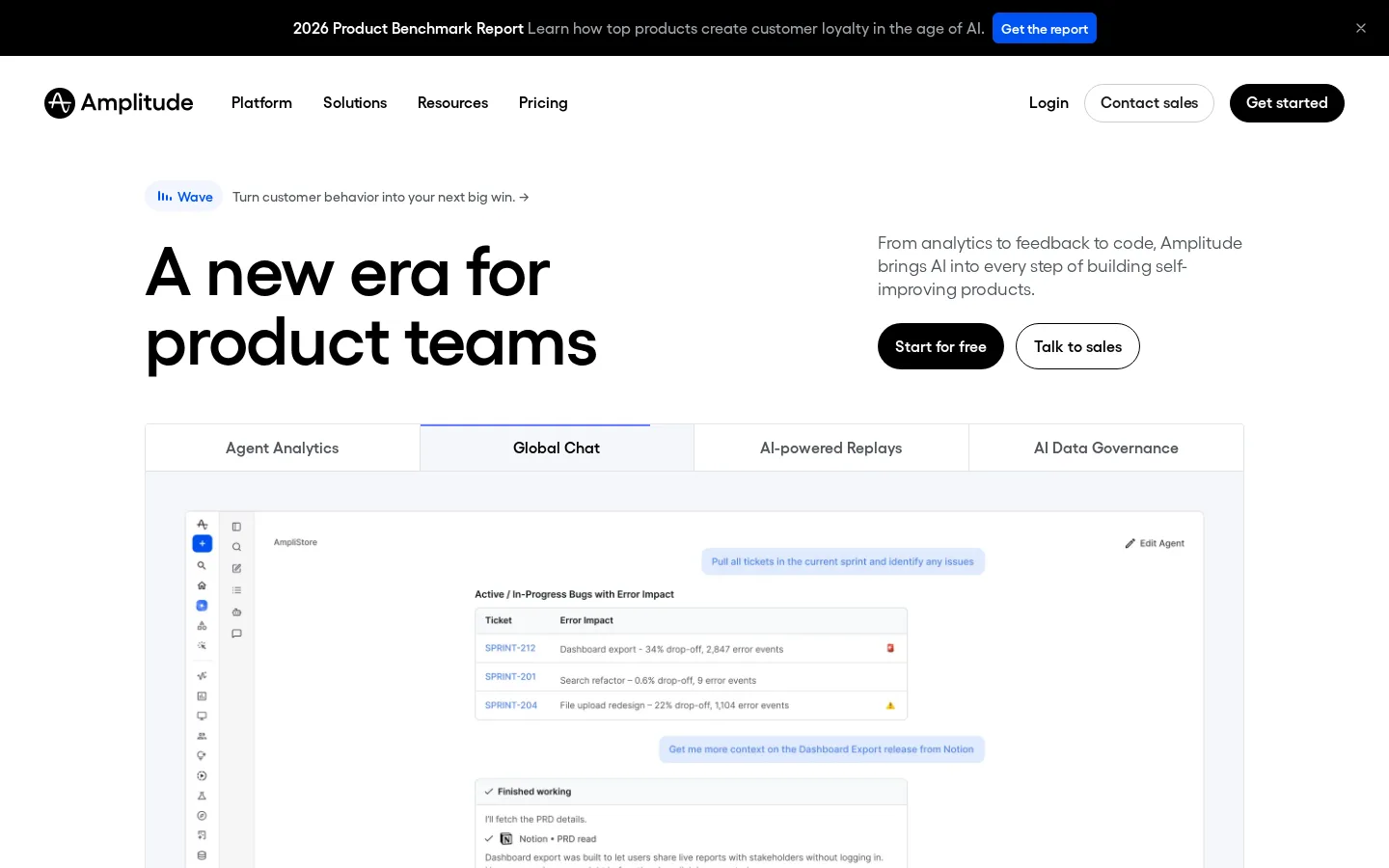
Amplitude reduces schema maintenance overhead by validating incoming data against defined rules before it pollutes reporting. It enforces schema rules directly at event ingestion, preventing malformed events from entering reports. This pipeline validation prevents manual cleanup down the road.
Source: amplitude.com
Mixpanel structures tracking around three core concepts: events, users, and properties. Because user actions and attributes map directly to these simple definitions, non-technical team members can understand the data model quickly. Planning a clean taxonomy early remains essential to avoid duplicate or inconsistent properties.
Both platforms enable self-serve reporting without requiring engineers to write custom database queries. In Amplitude, product teams can build funnels, retention charts, segmentation reports, and shared dashboards without writing SQL. When evaluating mixpanel vs amplitude for small budget operations, easy chart creation helps smaller teams find answers fast without dedicated data analysts.
We evaluate how easily teams maintain data integrity and build visual reports through our review methodology.
Side-by-Side Operational Criteria
Mixpanel tracks actions using a three-part model, while Amplitude provides structured governance out of the box. Deciding between mixpanel vs amplitude for small budget operations comes down to usage limits and reporting controls. Both platforms let non-technical team members build charts and dashboards without writing custom code.
Scroll the table →
Criterion
Mixpanel
Amplitude
Core data model
Built on events, users, and properties
User cohorts, events, and properties
Volume pricing structure
Event-based with excluded calls like $identify and profile updates
Tiered plans with custom event allowances
Schema governance
Tier-based controls with enterprise add-ons
Schema rule enforcement directly on event ingestion
Dashboard building
Interactive query builders with unlimited saved reports
Visual funnels, retention charts, and boards without SQL
Official Pricing and Tier Structures
Early-stage startups can build basic dashboards without upfront software spend. Evaluating these tools operations starts with comparing their baseline volume limits and billing models. Mixpanel uses an event-based model with Free, Growth, and Enterprise tiers, while Amplitude provides a free plan allowance of 2 million events per month.
Mixpanel does not require a trial period for its Free tier and grants unlimited saved reports alongside a monthly event limit. It excludes operations like $identify, $merge, and user profile updates from billable volume. Growth plans purchased after February 2025 also include a monthly allowance of free events.
Growing teams must account for specialized functionality that sits outside basic subscriptions. Mixpanel sells optional add-ons for Group Analytics, Data Pipelines, and Metric Trees to manage advanced tracking needs. These choices allow startups to expand capability without immediately paying for full enterprise contracts.
Pros and Cons of Mixpanel and Amplitude
Selecting between these tools teams comes down to data volume allowances and reporting workflows. Mixpanel structures its event-based tiers across Free, Growth, and Enterprise plans. In contrast, Amplitude supplies a standard free tier providing up to 2 million events per month.
Pros
• Mixpanel wins for early-stage teams wanting predictable tracking, while Amplitude wins on raw free volume.
• Amplitude supports data governance workflows by enforcing schema rules upon event ingestion.
• Both platforms let you analyze user journeys without SQL, but their packaging rules differ.
• When choosing these tools teams, Amplitude provides a clearly stated volume baseline.
Cons
• Mixpanel also excludes identity updates, profile creations, session records, and alias calls from billing calculations.
• Mixpanel helps preserve event capacity by excluding identity calls and profile updates from monthly billing.
• You can explore how these limits scale across analytics tools on our comparison hub.
• This pipeline validation prevents manual cleanup down the road.
Who Should Choose Mixpanel vs Amplitude
Early-stage teams evaluating these tools needs should prioritize predictable event accounting. Mixpanel offers a structured event-based model with Free, Growth, and Enterprise tiers. Its free tier provides unlimited saved reports without forcing a trial expiration, and excluded administrative calls like identity updates protect teams from sudden billing spikes.
Amplitude suits product organizations that need self-serve analytics with strict ingestion controls. Non-technical team members can create funnels, retention tables, and custom dashboards without writing SQL queries. Centralized data teams also benefit from schema rules enforced directly at ingestion to keep reports clean.
Frequently Asked Questions
Which tool requires less schema governance?
Amplitude supports data governance workflows by enforcing schema rules upon event ingestion. This structure keeps data clean for larger teams, but it demands stricter upfront tracking plans. Mixpanel reserves advanced data governance for its Enterprise tier, letting earlier-stage teams track events with less initial configuration overhead.
How intuitive is dashboard building in Mixpanel vs Amplitude?
Both platforms provide visual report builders that avoid raw SQL queries. Amplitude lets product teams construct funnels, segmentation charts, and dashboards without technical query writing. Mixpanel offers unlimited saved reports on its free tier, making routine reporting fast when balancing these tools operations.
Produced by
ToolNest Editorial
Independent software reviews, comparisons and guides for people who want their tools to feel lighter.
Keep reading
More from the nest.
 Comparisons
Compare PageFly vs Shogun for your Shopify store. See pricing, page speed impacts, theme integration, and which builder suits non-developers best.
 Reviews
Read our candid Figma review for small product teams. Discover how seat pricing, Dev Mode, and AI tools impact budget-conscious designers and developers.
 Comparisons
Evaluating Zoho CRM vs Freshsales for lean teams? Compare entry costs, built-in calling, and setup friction to pick the right pipeline under $30.
The ToolNest letter
Better tools, once a week.
One calm email with the reviews, comparisons and tools worth your attention.
Join the newsletter“Less noise. Better tools. A calmer stack.”