Figma Review for Small Product Teams in 2026
Read our candid Figma review for small product teams. Discover how seat pricing, Dev Mode, and AI tools impact budget-conscious designers and developers.

The Short Version
Figma remains the standard design tool, but its seat model requires careful management. In our figma review for small product teams, we found that mixed groups face extra monthly overhead when adding dedicated developer seats. Free view-only seats provide basic inspection tools, so lean groups can often skip dedicated developer add-ons.
The Professional tier charges $16 per Full seat and $12 per Dev seat monthly. Teams upgrading from a basic workspace like the one evaluated in our attio review will find that single-workspace limits and seat fees add up quickly. Weigh your developer inspection requirements before assigning paid licenses to technical teammates.
Figma Review for Small Product Teams: Value and Trade-offs
Figma remains the standard for collaborative interface design, but seat costs can catch lean startups off guard. This Figma review for small product teams examines whether the real-time workflows justify the monthly subscription expenses.
Figma seat pricing directly impacts mixed squads because developers now require dedicated paid licenses for advanced inspection. In this figma review for small product teams, understanding license allocation matters because teams often mix creators, engineers, and reviewers across different functional workflows.
Source: figma.com
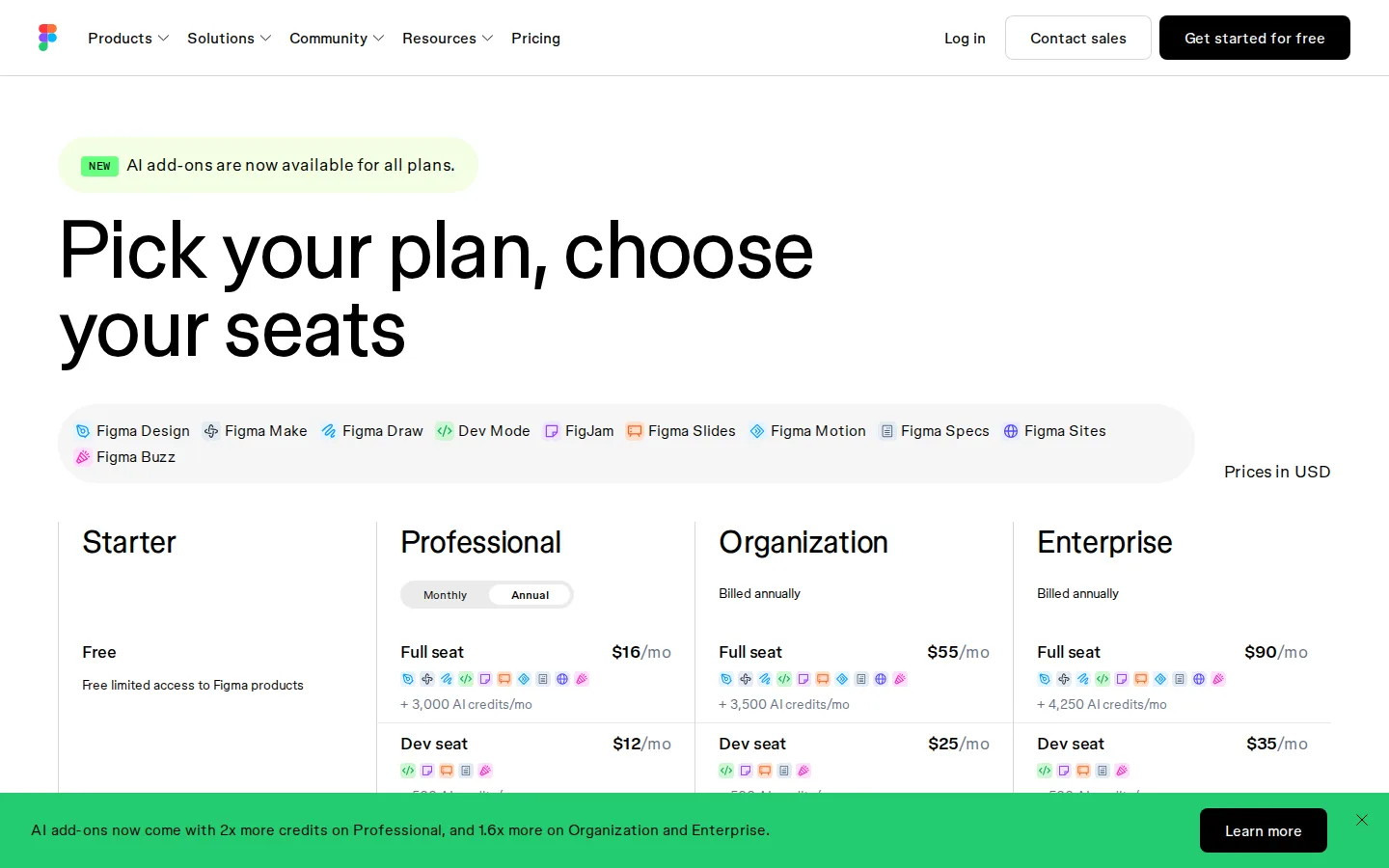
Figma uses a four-tier pricing model consisting of Starter, Professional, Organization, and Enterprise tiers. Across these tiers, paid seats are split into Full seats, Dev seats, and Collab seats. All tiers provide unlimited view-only seats without cost for team members who solely observe and comment.
Scroll the table →
Plan Tier
Full Seat
Dev Seat
Collab Seat
Professional
$16/month
$12/month
$3/month
Organization
$55/month
$25/month
$5/month
Enterprise
$90/month
$35/month
$5/month
On the Professional tier, Full seats cost $16 per month, Dev seats cost $12 per month, and Collab seats cost $3 per month on monthly billing. However, this tier restricts your group to a single team workspace and lacks design branching and cross-team shared libraries. Managing these seat expenses across growing squads requires careful pipeline tracking, much like evaluating subscription models in our Close CRM review (Close CRM Review: Is It Still the Best Pipeline for Outbound Teams?).
AI Tools in Daily Practice: Layout Drafts and Content
Figma AI speeds up initial wireframing and tedious layer hygiene, but it does not produce finished user interfaces. In day-to-day work, native AI features include First Draft generation, content replacement, automated layer renaming, background removal, and asset search. These tools take the pain out of placeholder text and manual asset hunting. Teams can compare this structured asset drafting with the workflow documented in our craft for teams review.
For anyone reading a figma review for small product teams, automated screen creation functions best as an unpolished canvas. Generated components and layouts provide rough structural outlines rather than production-ready screens. Designers still need to inspect responsive constraints, check token mapping, and refine final styling before handing screens to engineers.
Managing Design Systems Without External Plugins
A solo designer can successfully run a scalable design system using only core Figma features. The native toolset supports reusable components, multi-state variants, component properties, and design variables without mandatory third-party plugins. This allows an individual creator to build consistent UI foundations and publish shared libraries directly from the default interface.
This standalone workflow makes Figma for solo designers both practical and reliable across different workstations. Figma operates in standard web browsers and provides desktop applications built on Electron, ensuring smooth asset management everywhere. Readers comparing these capabilities across modern tools can explore our software review hub to evaluate alternative setups.
Solo builders also gain maintenance speed from built-in automation. Core Figma AI features include First Draft generation, automatic layer renaming, background removal, content replacement, and asset search. In this figma review for small product teams, native features prove robust enough to eliminate reliance on external system plugins.
Where Non-Design Collaborators Run Into Friction
Stakeholders can easily get lost when exploring complex canvases to review work. While all tiers provide free unlimited view-only seats for commenting and basic measurements, advanced review aids remain gated. Dedicated tools like change comparisons, annotations, and status markers require paid Dev Mode seats.
Canvas performance creates an extra hurdle during cross-functional reviews. Figma runs in standard web browsers and Electron desktop apps, but files with over 1,000 artboards or heavy variant counts suffer from sluggish panning. In our review methodology, we track how these canvas slowdowns impact non-designers trying to locate frames.
Editorial Evaluation Scorecard
Figma balances robust tooling with nuanced administrative costs across its tiers. Native components, variants, and design variables let a solo designer operate without mandatory plugins, while free view-only seats reduce baseline friction. However, managing paid Full, Dev, and Collab seats on the Professional tier requires planning for mixed teams.
Pros and Cons
Choosing the right platform comes down to specific workflow trade-offs. This figma review for small product teams highlights where the platform accelerates delivery and where technical constraints introduce friction.
Pros
• Native design systems handle reusable components, multi-state variants, and variables without third-party plugins.
• Free viewer seats let non-editing team members inspect measurements, copy code snippets, and export assets.
• Browser-based architecture and desktop apps ensure accessible real-time collaboration across operating systems.
• Figma divides paid users into Full seats, Dev seats, and Collab seats, while keeping view-only access free for anyone reviewing work.
Cons
• In our figma review for small product teams, we found that mixed groups face extra monthly overhead when adding dedicated developer seats.
• A comprehensive figma review for small product teams shows that adding paid seats for every developer quickly inflates software overhead.
• moving past Starter limitations forces small groups onto Professional workspaces that lack design branching and cross-team libraries.
• Figma AI speeds up initial wireframing and tedious layer hygiene, but it does not produce finished user interfaces.
Designers can maintain complete design systems natively using variables, multi-state variants, and component properties without external tools. Free viewers can still measure padding, view platform code snippets, and export assets without paid licenses. Web access and desktop wrappers keep cross-functional teammates aligned in real time.
Automated tools deliver rough drafts rather than production-ready screens. Variable management modals become awkward and cramped once a system scales past 50 tokens. Heavy files with over 1,000 artboards or eight active editors also trigger noticeable slowdowns.
Verdict: Who Should Choose Figma
Figma remains the strongest choice for product teams that need synchronized layout work and structured developer handoff in one platform. A solo designer can build comprehensive design systems using native components, variants, and variables without paying for third-party tooling. Mixed teams can keep seat expenses predictable by pairing single design editors with free view-only accounts or selective Dev seats.
For individual creators and independent leads, Figma handles complex design systems out of the box. Native tools support reusable components, multi-state variants, properties, and design variables without mandatory extensions. Routine layout tasks benefit from AI tools like First Draft and content replacement, although generated drafts serve as wireframes rather than finished screens.
The verdict
Verdict: Who Should Choose Figma
Mixed product squads do not have to purchase full-price seats for every collaborator. This this review highlights that developers needing change tracking and annotations pay $12 monthly for dedicated Dev seats on Professional. Engineers who only need measurements, CSS snippets, and asset exports can inspect everything on free view-only access.
Frequently Asked Questions
Evaluating software costs and technical limits helps determine whether this platform matches your delivery cycle. This this review answers common questions regarding seat structures, automation, and system administration.
How well do Figma AI features handle routine UI generation and text population?
Native AI features handle baseline UI drafting and asset populating effectively. The system generates layout options with existing design components and fills mockups with context-aware text and placeholder images. However, AI credits are metered under monthly caps and do not roll over to subsequent months.
Does the current seat-pricing structure punish mixed teams of designers and developers?
Figma limits unexpected overhead by splitting user tiers into Full, Dev, and Collab seats. Dev seats cost less than Full editor licenses across tiers, such as $12 monthly on Professional. Free viewers can still review files, post comments, and perform basic Dev Mode code inspection without paying for a seat.
Can a solo designer manage a full design system without third-party plugins?
A solo designer can build a comprehensive system using built-in tools alone. The platform supports reusable components, multi-state variants, component properties, and design variables natively. You can manage colors, numbers, booleans, and strings across modes without needing external token plugins.
Where does Figma create friction for non-design collaborators giving feedback?
Friction primarily occurs with offline access and variable administration. The platform has limited offline functionality, requiring active connections to load and sync updates reliably. Additionally, the variable management modal becomes cramped and awkward when maintaining lists above 50 tokens.
Produced by
ToolNest Editorial
Independent software reviews, comparisons and guides for people who want their tools to feel lighter.
Keep reading
More from the nest.
 Reviews
Read our honest Linear review for small agencies. Discover official pricing, key limits, and whether its focused issue tracking fits your client workflow.
 Reviews
Read our candid Notion review for small teams. Explore verified pricing, core trade-offs, and daily workflow fit to decide if it matches your needs.
 Reviews
Read our candid Penpot review. Open source UI design, native CSS Grid, self-hosting limits, and pricing evaluated for engineering-led product teams.
The ToolNest letter
Better tools, once a week.
One calm email with the reviews, comparisons and tools worth your attention.
Join the newsletter“Less noise. Better tools. A calmer stack.”


