Basecamp Review: Does Opinionated Simplicity Still Hold Up?
Our honest Basecamp review evaluates flat-rate pricing, calm communication, and whether rigid task management fits small agencies.

The short version
This basecamp review finds that packaged tiers replace painful per-seat licensing with predictable overhead. Plans start at $29 per month for five users up to $199 per month for unlimited seats on Pro Unlimited.
However, that financial clarity requires accepting fixed workflow constraints. Basecamp relies strictly on to-do lists and Kanban boards, leaving out Gantt charts, task dependencies, and native priority tags.
Basecamp Review: Flat Pricing Versus Seat-Based Costs
This Basecamp review assesses whether the platform's straightforward approach justifies its trade-offs for growing teams. Flat pricing keeps software costs steady as your headcount expands, but you must work within rigid project templates.
Basecamp trades complex workflow depth for rapid adoption and reliable cross-platform communication. Dedicated apps run smoothly across macOS, Windows, iOS, and Android. However, to-do lists omit dependencies and Gantt views, making strict project control difficult compared to platforms evaluated in our Anytype Review: Local-First Private Notes for Data-Conscious Teams.
In this basecamp review evaluation, the package tiers provide predictable budgeting without per-seat penalty fees. Teams scale from Freelancer at $29 monthly to Pro Plus at $99 or Pro Unlimited at $199. Growing operations avoid escalating software bills, provided they do not require deep dependency tracking.
Communication Design and Day-to-Day Project Tools
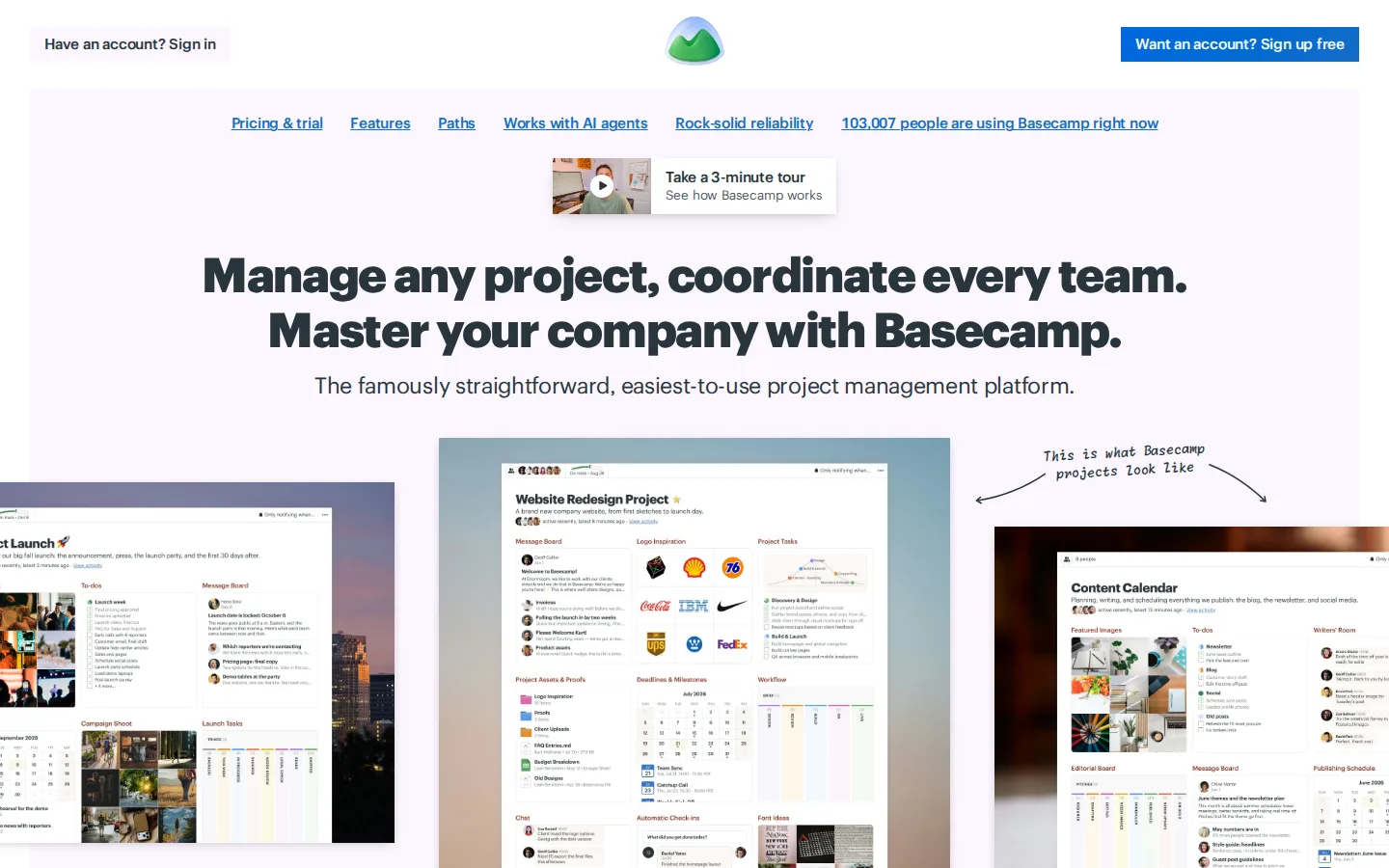
Basecamp replaces chaotic chat notifications and scattered email threads with centralized discussion spaces. In our basecamp review, we found that combining message boards, group chat, and shared files inside each project keeps team conversations organized in one predictable place.
Source: basecamp.com
Teams can coordinate seamlessly regardless of operating system. Basecamp provides dedicated apps for macOS, Windows, Android, iOS, and iPadOS, as well as a web interface. Anyone reading our coda review will note that Basecamp takes an opinionated, out-of-the-box approach rather than offering open-ended canvas building.
Daily task tracking remains deliberately lightweight. Tasks in Basecamp support checklists and due dates but lack task dependencies and priority tags. Furthermore, Basecamp lacks Gantt chart and table views, relying primarily on Kanban boards and to-do lists to track progress.
Managing Sprint Deadlines Without Gantt Charts or Subtasks
Basecamp cannot manage complex sprint schedules that depend on strict task sequencing. The platform omits Gantt charts and table views entirely, organizing work through Kanban boards and simple to-do lists instead.
While tasks accommodate checklists and explicit due dates, they offer no native task dependencies or priority tags. This structure complicates work for technical teams who need automated critical paths or parent-child task tracking.
Software development squads with rigid agile milestones will likely hit friction with basecamp project management. For alternatives with detailed scheduling mechanics, consult our software review hub.
Predictable billing: how flat packages compare to per-seat models
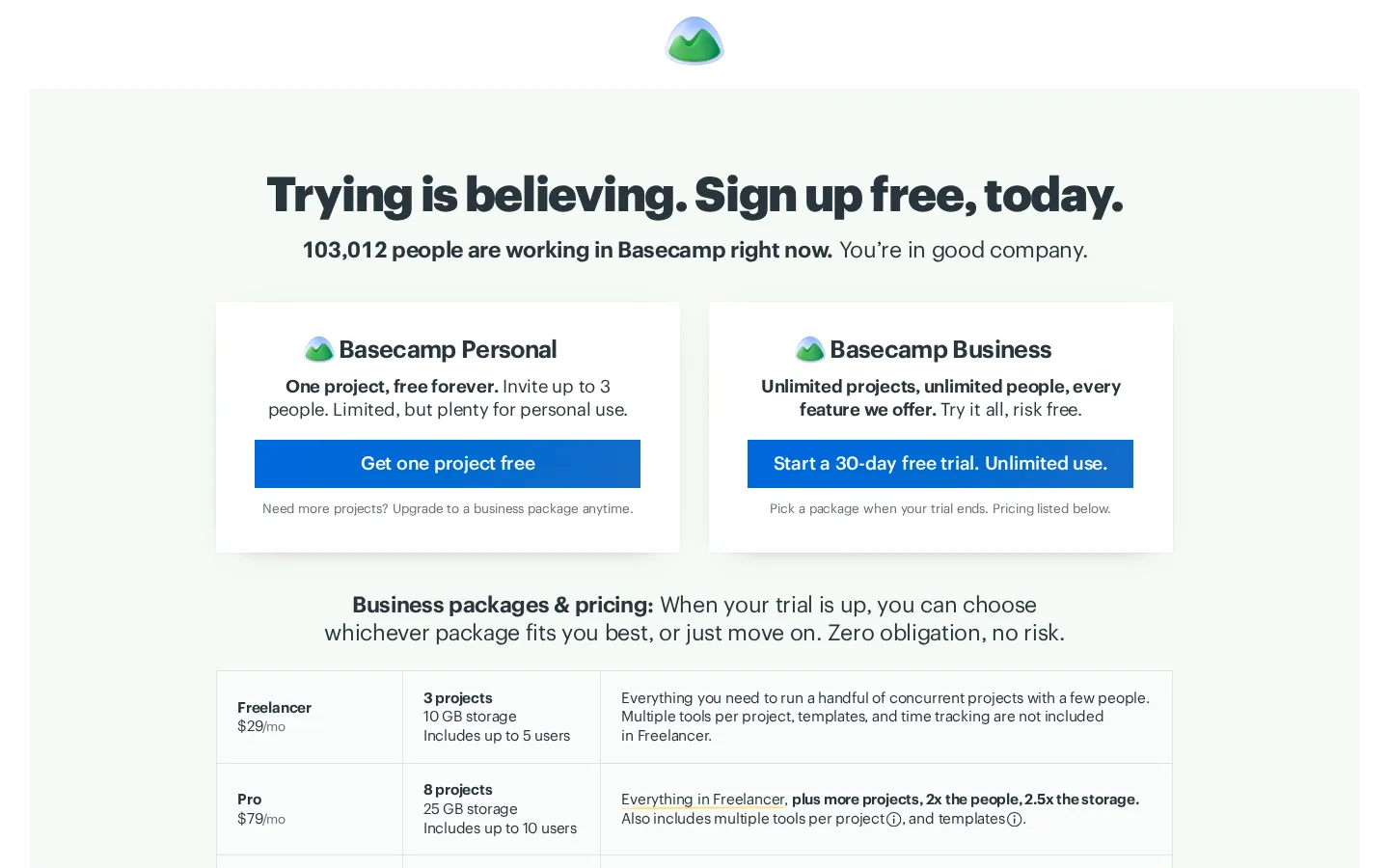
Fixed pricing packages prevent software bills from swelling as headcount expands. In our basecamp review, the structured tiers favor teams with fluctuating client rosters over tools charging by individual logins. Small agencies can choose between tiered capacity or unrestricted access depending on their project volume.
Source: basecamp.com
Scroll the table →
Plan
Price
User Limit
Active Projects
Storage
Free
$0
3 users
1 project
1 GB
Freelancer
$29/month
5 users
3 projects
10 GB
Pro
$79/month
10 users
8 projects
25 GB
Pro Plus
$99/month
15 users
12 projects
100 GB
Pro Unlimited
$199/month billed annually
Unlimited
Unlimited
1,000 GB
Choosing the right tier requires weighing functional boundaries alongside user limits. The entry tiers cap active workspaces and lack time tracking, whereas the Pro Unlimited tier provides personal onboarding and priority support. In keeping with our review methodology, evaluate total active workload rather than headcounts alone to maximize value from basecamp flat rate pricing.
Basecamp Pros and Cons
Basecamp excels at simple collaboration but restricts complex tracking. Evaluating these practical trade-offs is essential for any balanced basecamp review before committing your team.
Pros
• Predictable flat pricing with packages like Pro Unlimited for $199 per month supporting unlimited users and projects.
• Built-in official AI connectors for ChatGPT, Claude, and Model Context Protocol agents.
• Broad platform access through native apps on macOS, Windows, iOS, iPadOS, and Android.
• Plans start at $29 per month for five users up to $199 per month for unlimited seats on Pro Unlimited.
Cons
• Tasks in Basecamp support checklists and due dates but lack task dependencies and priority tags.
• Furthermore, Basecamp lacks Gantt chart and table views, relying primarily on Kanban boards and to-do lists to track progress.
• Basecamp cannot manage complex sprint schedules that depend on strict task sequencing.
• Software development squads with rigid agile milestones will likely hit friction with basecamp project management.
Flat-tier subscriptions prevent runaway per-seat fees as headcount expands. However, the platform omits Gantt charts, table views, priority tags, and task dependencies. Basic plans also exclude project templates and time tracking.
Who Should Choose Basecamp
Basecamp suits growing agencies that want transparent communication without paying climbing per-seat fees. While small shops can start at $15 per user monthly, teams scaling up benefit from the Pro Unlimited flat rate of $299 per month. This predictable model simplifies overhead as your team expands.
The verdict
Who should choose Basecamp
However, technical teams managing complex engineering sprints will struggle with this setup. Basecamp lacks Gantt charts, subtask dependencies, and priority flags, relying instead on basic to-do lists and Kanban boards. If your work demands strict critical-path tracking, look elsewhere.
Basecamp Frequently Asked Questions
Evaluating project software requires clarity on pricing, views, and team workflows. This this review FAQ addresses core questions about features, flat rates, and day-to-day operations.
How does Basecamp pricing work?
Basecamp offers tiered flat packages rather than per-seat pricing. Plans range from a limited Free tier to Freelancer at $29 monthly for 5 users, Pro at $79 monthly for 10 users, Pro Plus at $99 monthly for 15 users, and Pro Unlimited at $199 per month billed annually for unlimited users.
Is Basecamp good for small agencies?
Yes, Basecamp works well for small agencies that need fixed costs and unified client workspaces. The Pro and Pro Plus packages provide reusable templates, multiple tool boards per project, and built-in time tracking without increasing costs per seat.
Can Basecamp replace Slack and email?
Basecamp replaces internal status emails and chat channels with dedicated message boards and real-time pings. However, it organizes conversations around specific projects rather than wide company-wide discussion channels, which changes how teams communicate.
Does Basecamp have Gantt charts?
No, Basecamp lacks native Gantt charts, timeline views, and spreadsheet tables. The platform organizes tasks strictly through checklists and Kanban card tables, intentionally omitting dependencies and priority flags.
Is Basecamp worth it for remote teams?
Basecamp suits remote teams that prefer asynchronous updates over constant real-time interruptions. With native apps across macOS, Windows, iOS, and Android, distributed teams can coordinate schedules, tasks, and files in a single shared hub.
Produced by
ToolNest Editorial
Independent software reviews, comparisons and guides for people who want their tools to feel lighter.
Keep reading
More from the nest.
 Reviews
Our Slite review breaks down pricing, document structure, and trade-offs to help remote managers choose the right team wiki without bloat.
 Reviews
Read our candid Mintlify review for engineering leads. Explore pricing tiers, Git workflows, and trade-offs for small software teams.
 Reviews
Read our candid GitBook review covering pricing, Git sync, the WYSIWYG editor, and whether it fits your team’s internal and external docs.
The ToolNest letter
Better tools, once a week.
One calm email with the reviews, comparisons and tools worth your attention.
Join the newsletter“Less noise. Better tools. A calmer stack.”