Craft for Teams Review: Beautiful Docs and Daily Notes Evaluated
Our Craft for Teams review explores native performance, daily notes, collaboration limits, and pricing to help small design teams decide.

The short version
For groups prioritizing polished documentation, our craft for teams review finds that Craft shines at producing clean, publication-ready materials with minimal setup. It supports real-time synchronization, offline editing, and integrated daily planning alongside core documents. However, teams evaluating permissions should note that Craft restricts access controls to individual documents rather than full folders, which limits complex workspace hierarchies compared to what we highlight in our notion review for small teams.
Craft for Teams Review: Native Design and Daily Workflows
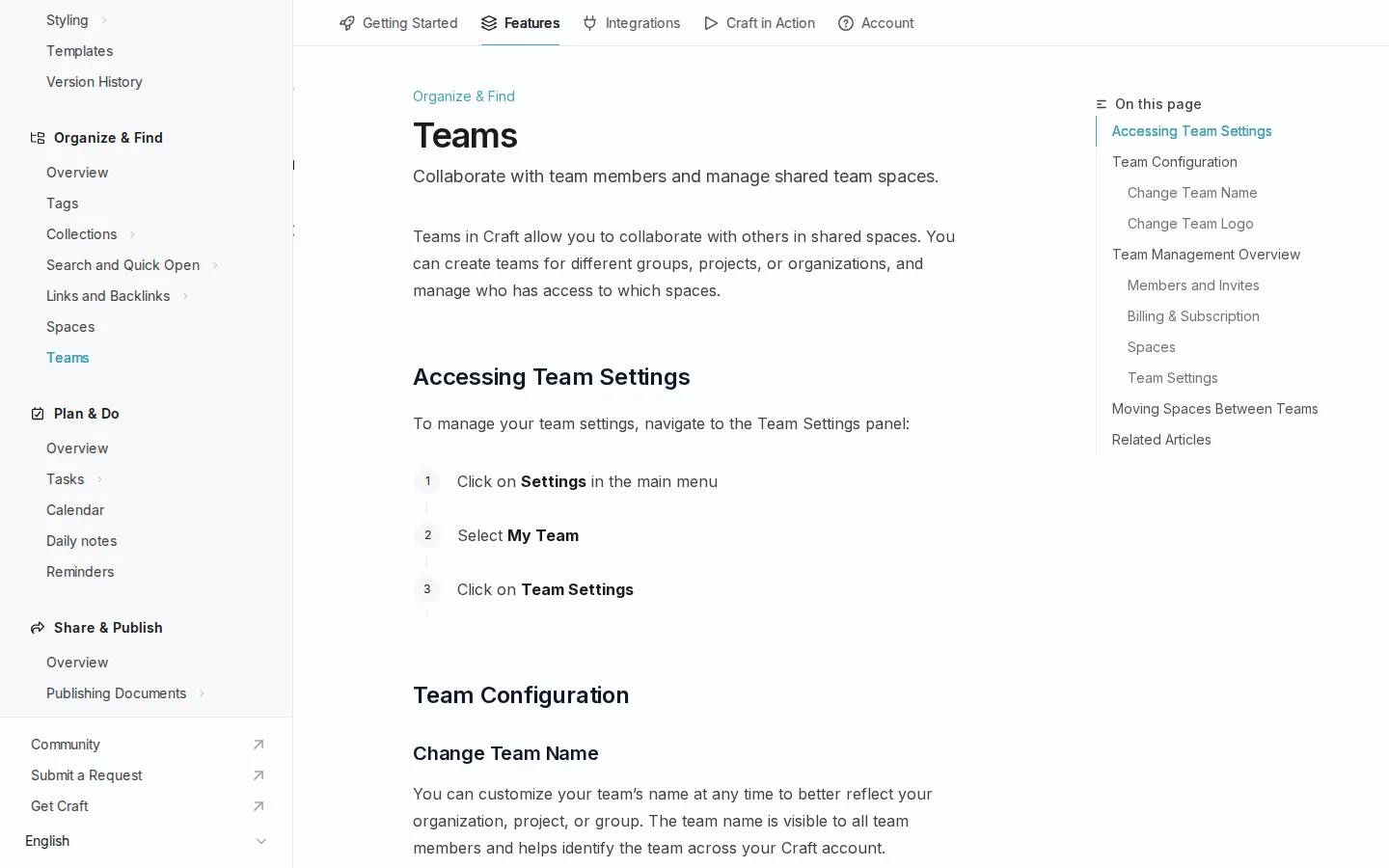
Bridging private task planning and shared company knowledge often feels fragmented in traditional wikis. The Craft documentation tool addresses this tension by pairing structured team repositories directly with personal day-to-day writing. Team accounts support up to 25 shared team spaces for collaboration alongside separate personal spaces for each colleague. Because Craft incorporates daily notes, scheduled tasks, and calendar events directly alongside standard documents, contributors can draft agenda items or personal checklists without exposing unfinished notes to the broader organization.
Source: support.craft.do
For distributed operations, Craft provides real-time cross-device synchronization and offline editing across supported platforms. Native clients run on macOS, iOS, iPadOS, Vision Pro, Windows, Android, and modern web browsers. While the Apple ecosystem receives the most polished interface, teams collaborating across mixed operating systems still retain offline writing parity. Remote workers summarizing a meeting alongside a Loom review style walkthrough can update operational handbooks seamlessly even while disconnected.
When evaluating how does craft compare to notion for teams, structure and permissions introduce noticeable differences. In this craft docs review, granular controls stand out as a limitation: permissions allow sharing individual documents with view, edit, or comment rights, but folder-level permission sharing is not supported. History tracking is also bounded, limiting document version history to 7 days on the free Starter tier and 30 days on Plus and Team plans, with unlimited history reserved for Enterprise accounts.
Regarding craft collaboration pricing, individual contributors can evaluate the platform on the free Starter tier capped at 1,500 blocks, 1 GB of storage, and 25 MB per media upload, while the Plus tier costs $10 monthly or $96 annually (effective $6.40 per month) before scaling into multi-seat team packages.
Cross-platform editing and synchronization
Conducting a comprehensive craft for teams review means looking at how seamlessly contributors can co-author documents when they are not all using Apple hardware. Craft provides real-time cross-device synchronization and offline editing across supported platforms, keeping shared notes coherent even when collaborators disconnect mid-sentence.
Platform parity reveals notable trade-offs for mixed-hardware workplaces. Craft maintains native applications for macOS, iOS, iPadOS, Vision Pro, Windows, Android, and the web, though reviews note the Windows and web experiences are less polished than on Apple platforms. Readers evaluating cross-platform tools across our software review hub will notice the difference immediately if non-Mac users make up a significant portion of the organization.
Document-level collaboration handles simultaneous input well, supported by shared environments. Team accounts support up to 25 shared team spaces for collaboration alongside personal spaces for each member. However, permission architecture has specific boundaries: Craft permissions allow sharing individual documents with view, edit, or comment rights, but folder-level permission sharing is not supported.
Teams evaluating craft collaboration pricing should consider revision protections as document size scales. Craft limits document version history to 7 days on the free tier and 30 days on Plus and Team plans, with unlimited history reserved for Enterprise.
Team spaces and administrative controls
In any craft for teams review, workspace boundaries determine whether growing companies can stay organized without cluttering daily workflows. Team accounts support up to 25 shared team spaces for collaboration alongside personal spaces for each member. This layout keeps individual scratchpads separate while carving out dedicated areas for cross-functional projects, departments, or client work.
When assessing whether is craft good for team collaboration, administrative controls handle central management through a dedicated team settings panel. Administrators can invite colleagues via email, manage pending invitations, and remove members as staffing changes. Centralized billing, customizable team branding, and the ability to relocate shared spaces between teams provide practical boundaries, though fine-grained folder or document-level permission controls remain limited compared to enterprise platforms.
As outlined in our review methodology, evaluating collaborative software requires looking closely at how permissions scale as headcounts rise. Organizations with complex access-control requirements across nested folders may find Craft's space-level division simpler than traditional enterprise wikis, making it best suited for lightweight, modular team setups.
Craft Collaboration Pricing, Tiers, and Data Portability
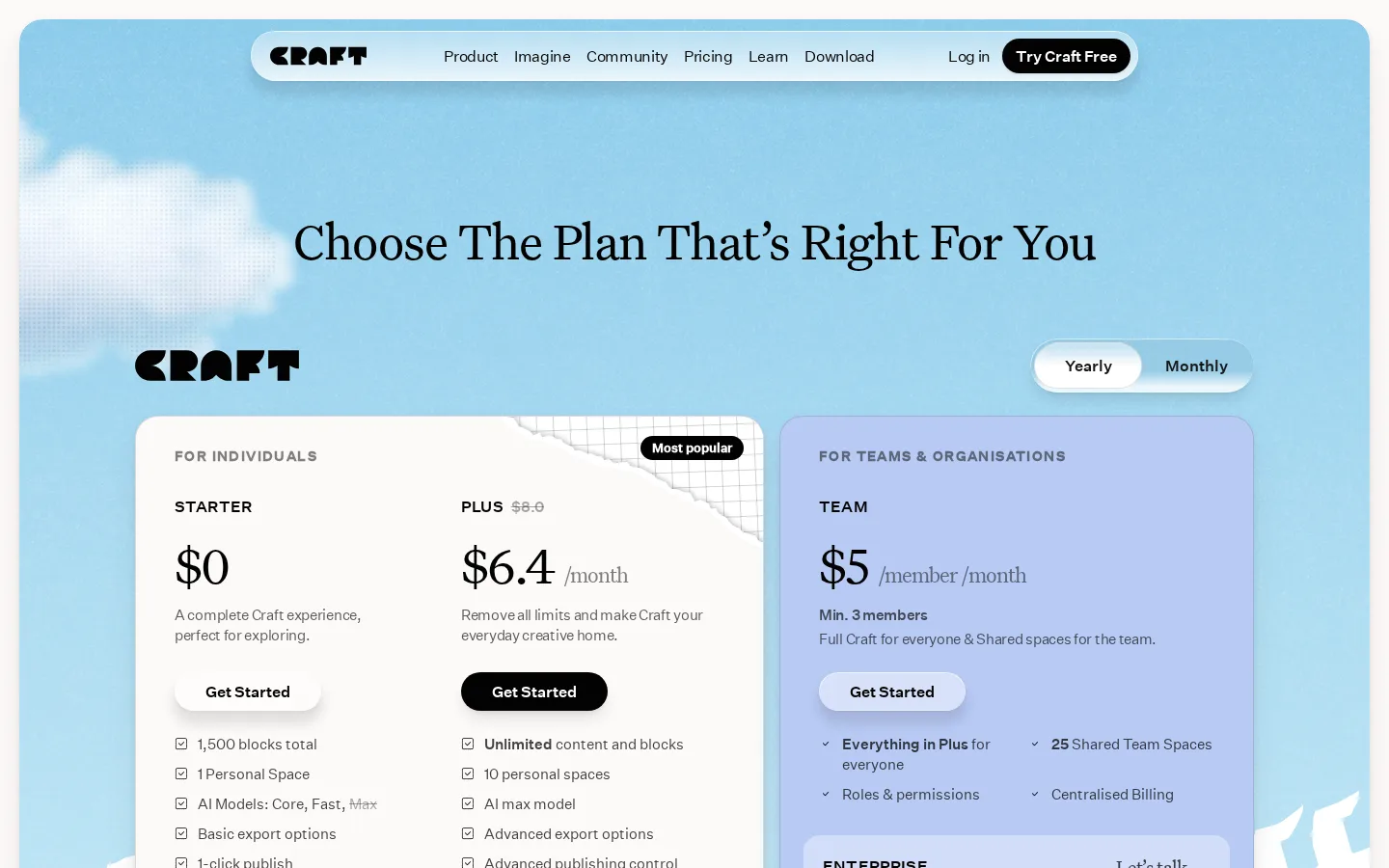
Evaluating craft collaboration pricing starts with understanding the team tier. Craft's official Team plan costs $5 per user per month on annual billing ($60 per member per year), or $6 per user per month on monthly billing. Individual users can test the platform on a free Starter tier capped at 1,500 blocks, 1 GB of storage, and 25 MB per media upload, or upgrade to the Plus plan at $10 monthly or $96 annually (effective $6.40 per month).
Source: craft.do
For companies assessing whether Craft is good for team collaboration, the Team account provides up to 25 shared team spaces alongside 10 personal spaces per member, with each personal space carrying 1 TB of storage separated from team environments. Alongside structured daily notes, scheduled tasks, and calendar events, Craft includes real-time cross-device synchronization and offline editing across supported platforms.
Organizations with strict administrative or compliance needs should note two current limitations in this craft documentation tool: single sign-on (SSO) remains exclusive to the Enterprise tier, and admin controls to restrict who can invite new members to shared spaces are listed as coming soon. Document version history is capped at 30 days on Plus and Team plans (7 days on the free tier), with unlimited history reserved for Enterprise.
Data portability is straightforward if a team decides to migrate away from the craft app for teams. Craft supports direct document exports to PDF, Markdown, MS Word (.docx), PNG, Print, and TextBundle, avoiding proprietary lock-in for standard documentation.
Pros
• Craft enables seamless real-time synchronization and offline document editing across all supported native applications and web browsers.
• Craft provides up to 25 shared team spaces alongside dedicated private spaces to separate company knowledge.
• Craft integrates daily notes, calendar events, and scheduled tasks directly alongside standard documentation tools.
Cons
• Craft restricts permissions to individual documents because it does not support folder-level access sharing.
• Craft limits document version history to 30 days unless organizations upgrade to the Enterprise plan.
In our craft for teams review, Craft stands out for design-focused agencies, consultants, and Apple-centric groups that prioritize speed and presentation. The native application provides fluid offline editing and instant syncing, making it noticeably faster than browser-heavy tools. It is ideal for producing polished, client-facing materials because exports in PDF, Markdown, and HTML formats look finished immediately.
The verdict
Who should choose Craft for team collaboration
However, larger organizations or teams requiring complex project tracking will quickly find limitations. While Craft supports real-time editing, comments, and up to 25 shared team spaces, its permissions remain basic. You can assign view, edit, or comment access to single documents, but folder-level controls and granular administration are missing. Teams needing intricate relational databases or enterprise-grade permissions should stick with more flexible alternatives.
How does Craft compare to Notion for teams?
In evaluating Craft for teams, Craft focuses on fast native performance, offline editing, and daily planning alongside documents. Unlike complex workspace platforms, Craft organizes work across up to 25 shared spaces and includes 10 personal spaces per seat with 30-day version history. However, it lacks advanced enterprise admin controls such as native SSO or invitation restrictions on team tiers.
What are Craft export options?
Craft supports exporting documents to PDF, Markdown, MS Word (.docx), PNG, TextBundle, and direct Print formatting.
How much does Craft for teams cost?
Craft collaboration pricing on the Team tier is $5 per user per month billed annually ($60 per member per year), or $6 per user per month on monthly billing. Each seat includes up to 25 shared spaces, 10 personal spaces with 1 TB of storage each, and 30-day version history.
Produced by
ToolNest Editorial
Independent software reviews, comparisons and guides for people who want their tools to feel lighter.
Keep reading
More from the nest.
The ToolNest letter
Better tools, once a week.
One calm email with the reviews, comparisons and tools worth your attention.
Join the newsletter“Less noise. Better tools. A calmer stack.”


