Asana Review for Small Agencies: Calm Work Management
Our candid Asana review for small agencies breaks down pricing, daily workflows, fit, and key trade-offs without the hype. See if it fits your team.

Asana Review for Small Agencies: Core Strengths and Limits
If you need structured workflows without endless setup, this Asana review for small agencies breaks down where the platform excels and where costs add up.
There’s also a $24.99 per user, per month Advanced plan
The platform offers timeline views, automations, and over 100 app integrations. However, independent research notes that entry pricing runs higher than alternatives like monday work management, and customer support lacks live chat and phone channels.
Sample scorecard: Asana for small agencies
Starting a new project takes just seconds and, once you’ve imported all of your tasks, there’s not much of a learning curve.
What does Asana cost, and what does each tier include?
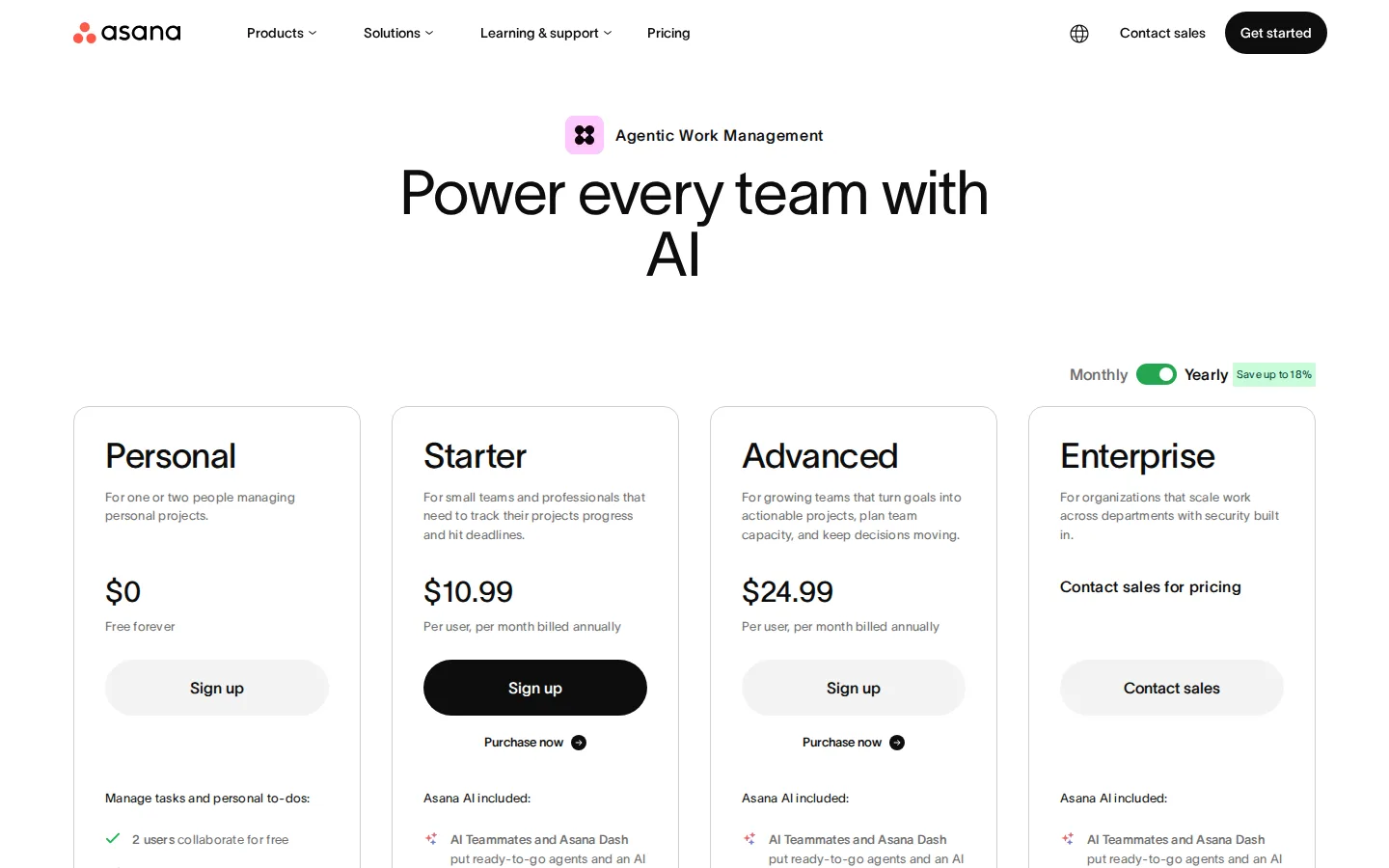
Asana's entry point is the free Personal plan, designed for solo users or pairs. It supports up to two users and provides unlimited tasks and projects, file uploads capped at 100MB per file, and integrations with over 100 external applications such as Google Drive, Slack, and Zoom.
The Starter plan costs $10.99 per user per month billed annually, or $13.49 per user per month on monthly billing. This tier introduces timeline and Gantt views, custom fields, reporting dashboards, forms, unlimited automations, and unlimited free guest accounts. It also adds AI Teammates and Asana Dash with 5 requests per user per month, up to 50 requests per account. Third-party research notes that Asana's entry pricing sits higher than entry tiers for alternatives like monday work management and Smartsheet.
For growing teams needing cross-project coordination, the Advanced plan runs $24.99 per user per month billed annually, or $30.49 billed monthly. It retains the same AI request allowances as Starter while adding portfolios, strategic goals, workload resource management, native time tracking, approvals, and proofing tools.
Enterprise+ tier (custom pricing), which will suit you if you’re part of a larger organization with IT departments and more stringent needs.
Daily agency workflow: tasks, views, and automations
Small agencies coordinating deliverables across multiple clients typically rely on clear schedules and repeatable processes. On Asana Starter, which costs $10.99 per user per month billed annually or $13.49 billed monthly, teams gain access to timeline and Gantt views alongside custom fields and reporting dashboards. These views allow project managers to track dependencies and balance shifting client milestones, while forms standardise intake requests directly into tasks.
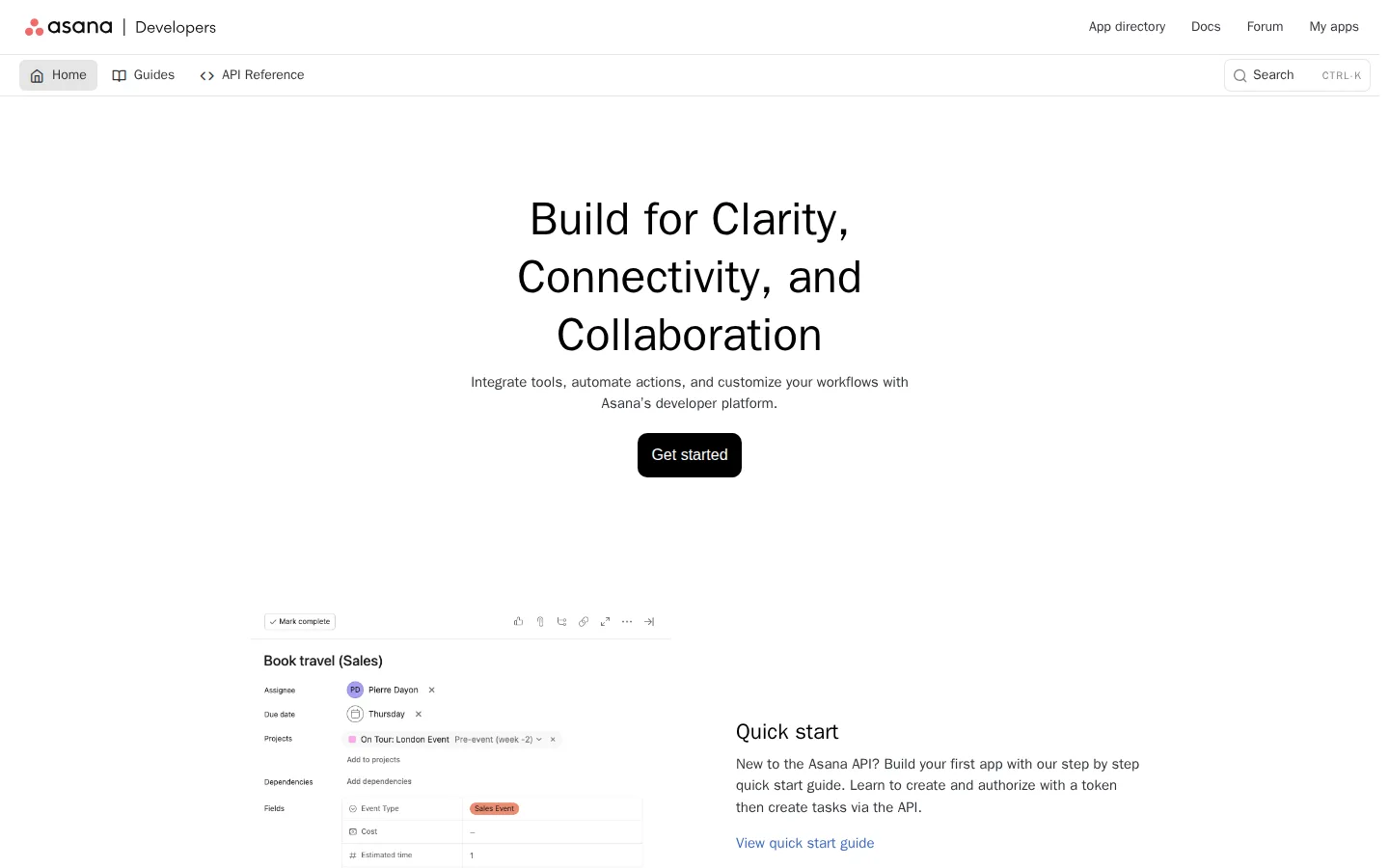
To keep production moving without constant manual intervention, the Starter tier supports unlimited automations to route assignments and trigger status changes. For more bespoke requirements, Asana's developer platform supports rule actions, webhooks, API tokens, and embedded app components on tasks. Agencies can also bridge external tools using over 100 native integrations, including Slack, Google Drive, and Zoom.
Source: developers.asana.com
Client collaboration is handled through unlimited free guest accounts, ensuring external contractors and stakeholders can review deliverables without consuming paid seats. Additionally, Starter plans include AI Teammates and Asana Dash with an allocation of 5 requests per user per month up to 50 requests per account.
Workload tracking, portfolios, and developer platform
For teams scaling past basic project boards, Asana reserves strategic management features for its Advanced tier, priced at $24.99 per user per month when billed annually or $30.49 billed monthly. This package introduces multi-project portfolios, goal tracking, native time tracking, approvals, proofing, and workload resource management to monitor individual team member capacity.
Technical integrations and custom engineering connect deeply across workflows. Asana integrates with over 100 external applications, including Slack, Google Drive, and Zoom. In addition, its developer platform allows technical teams to build custom integrations using webhooks, API tokens, rule actions, and UI app components embedded directly on tasks.
Source: asana.com
Tiered features and pricing breakdown
Asana offers a free Personal plan for up to two users, providing unlimited tasks, projects, and 100MB file uploads. The Starter tier costs $10.99 per user per month billed annually ($13.49 monthly) and incorporates custom fields, timeline and Gantt views, reporting dashboards, forms, unlimited automations, and unlimited free guest seats. However, research indicates that Asana's entry pricing is higher than entry packages for monday work management and Smartsheet.
Both the Starter and Advanced tiers include AI Teammates and Asana Dash, capped at 5 requests per user per month up to 50 requests per account. Beyond these plans, Enterprise and Enterprise+ tiers require a custom sales quote. The Enterprise tier provides SAML authentication, SCIM provisioning, and service accounts, while Enterprise+ adds SIEM integration, audit logs, dedicated workspaces, and data residency.
Independent assessments provide a balanced view of day-to-day operations. Third-party testing noted that Asana's CSV data imports run faster than imports on ClickUp or monday work management. On the other hand, reviewers highlight that Asana lacks real-time live chat and phone-based customer support, relying instead on help documentation and guides.
Where Asana falls short compared to alternatives
Asana's pricing structure carries an entry-level premium when compared to notable competitors. The entry Starter tier costs $10.99 per user per month when billed annually, or $13.49 per user per month on a monthly schedule. Third-party research indicates that this entry price point sits higher than rival entry tiers for platforms such as monday work management and Smartsheet.
Teams requiring advanced capabilities must step up to the Advanced tier, which costs $24.99 per user per month billed annually or $30.49 billed monthly to unlock portfolios, strategic goals, workload resource management, native time tracking, approvals, and proofing tools. Larger deployments evaluating Enterprise and Enterprise+ tiers encounter unlisted public pricing, requiring direct coordination with sales.
Support availability presents another clear trade-off. Third-party reviewer assessments report that Asana lacks both real-time live chat and phone-based customer support channels, meaning teams needing immediate human intervention must rely on asynchronous ticket submission or self-service documentation.
Pros and Cons
Pros
• Asana includes unlimited free guest accounts on paid tiers.
• Asana provides unlimited automations on the Starter tier.
• Asana integrates with over 100 apps, including Slack and Google Drive.
• Asana's free Personal plan suits solo users and pairs.
Cons
• Asana lacks live chat and phone support, leaving teams with self-serve documentation.
• Asana's entry price is higher than monday work management and Smartsheet for small teams.
• Asana Enterprise and Enterprise+ tiers require a custom sales quote.
Third-party research shows Asana's entry-level pricing sits higher than competitors like monday work management and Smartsheet. Support is another limitation: independent reviews note Asana lacks live chat and phone support. Additionally, the free tier caps collaboration at two users, making it unsuitable for growing teams needing no-cost setups.
Verdict: who should choose Asana?
Asana suits small agencies that need structured task delivery and straightforward client collaboration. The Starter plan ($10.99 per user per month billed annually) covers essential needs with timeline views, custom fields, intake forms, and unlimited free guest seats.
Growing agencies managing cross-project capacity and asset reviews will find the Advanced tier ($24.99 per user per month billed annually) practical for its native time tracking, workload balancing, and proofing tools.
Teams on tight budgets or those needing immediate assistance should look elsewhere. Third-party research reports that Asana's entry price is higher than starters for monday work management and Smartsheet, and the platform lacks phone support and live chat.
Frequently Asked Questions
What are the limits on Asana’s free plan?
The Asana Personal plan is free for up to two users. It includes unlimited tasks, unlimited projects, and file uploads capped at 100MB per file.
How does guest access work on paid tiers?
Starting with the Starter tier, Asana provides unlimited free guest accounts so external contractors and clients can collaborate without taking up paid user licenses.
How does Asana handle data migration?
Asana allows teams to import data via CSV files, which independent third-party software testing recorded as faster than imports on ClickUp and monday work management.
What does Asana cost across its paid plans?
The Starter plan costs $10.99 per user per month billed annually ($13.49 billed monthly), while the Advanced plan costs $24.99 per user per month billed annually ($30.49 billed monthly). Enterprise and Enterprise+ tiers require contacting sales for pricing.
Asana offers a restricted free tier alongside tiered paid plans. Personal accounts support up to two users with 100MB file limits, while Starter ($10.99/user/month annually) unlocks unlimited guest access. Advanced costs $24.99 per user per month annually, and higher tiers require custom quotes. In testing, importing external data via CSV was quicker than on rival tools.
Related reading: Loom Review.
For a closer look, read our software review hub and our review methodology.
For a closer look, read our software review hub and our review methodology.
Produced by
ToolNest Editorial
Independent software reviews, comparisons and guides for people who want their tools to feel lighter.
Keep reading
More from the nest.
The ToolNest letter
Better tools, once a week.
One calm email with the reviews, comparisons and tools worth your attention.
Join the newsletter“Less noise. Better tools. A calmer stack.”


