Close CRM Review: Is It Still the Best Pipeline for Outbound Teams?
Read our honest Close CRM review to see if its built-in calling, SMS, and pipeline workflows justify the price for lean outbound sales teams.

The short version
Close pays off when fast outbound calling drives your pipeline, but it carries a higher base price than typical pipeline-only tools. The Essentials tier starts at $35 per user per month billed annually for unlimited leads, while automated workflows and power dialing require the $99 Growth plan. For teams balancing communication speed against cost, evaluating daily sales volume makes the trade-off clear.
Close CRM Review: Pricing and Plan Comparison
This Close CRM review examines whether the platform's speed and built-in communication tools justify its strict data limits.
Close delivers rapid value for outbound teams by unifying calls and emails, but its operational trade-offs require careful planning. Full team onboarding and adoption can occur in as little as two weeks, making it far simpler to deploy than enterprise competitors.
The platform makes conscious sacrifices outside outbound execution. Close uses a fixed data model consisting of leads, contacts, and opportunities, with no support for custom objects. It also lacks native proposal generation, quoting features, and marketing automation.
Solo operators must review baseline limits before buying. The Solo plan is restricted to one user and has a cap of 10,000 leads. This Close CRM review scorecard reflects high execution speed alongside strict functional boundaries.
Built-In Calling, SMS, and High-Velocity Outreach
Close eliminates app switching by placing calling, SMS, email, and deal stages on one shared lead screen. High-volume outbound teams move faster because reps never juggle separate third-party dialers or manual call logging tools. While full team onboarding and adoption can occur in as little as two weeks, small businesses must weigh this speed against structural limitations.
Our Close CRM review shows the platform prioritizes conversational momentum over broad administrative flexibility. The system uses a fixed data model consisting of leads, contacts, and opportunities, with no support for custom objects. Teams also operate without native proposal generation, quoting features, and marketing automation.
• Native telephony and two-way SMS log directly to the unified contact timeline.
• The Solo plan is restricted to one user and has a cap of 10,000 leads.
• Teams selling complex product catalogs or e-commerce products—such as those comparing gorgias vs zendesk for shopify—often require supplemental tools for quoting and order tracking.
For small sales crews making dozens of calls daily, the built-in dialer and SMS engine justify skipping low-cost visual pipeline trackers. You pay for conversational throughput rather than enterprise customization.
Moving from spreadsheets to automated pipelines
Sales teams transitioning from manual spreadsheets face a gentle learning curve. Full team onboarding and adoption can occur in as little as two weeks because calling, email, and deal stages share one workspace. As highlighted in our software review hub, removing disconnected tools helps new reps reach full productivity quickly.
Data migration remains straightforward because Close uses a fixed data model consisting of leads, contacts, and opportunities, with no support for custom objects. Single-operator teams evaluating this Close CRM review should remember the Solo plan is restricted to one user and has a cap of 10,000 leads. Keep in mind that Close lacks native proposal generation, quoting features, and marketing automation, so complex spreadsheet workflows may require external software.
Where Close falls short: Account management and marketing gaps
Close struggles when revenue operations extend beyond initial deal acquisition. In our Close CRM review, we evaluate software against the full customer lifecycle using our review methodology. The platform relies on a rigid schema of leads, contacts, and opportunities, preventing teams from modeling intricate account hierarchies or delivery milestones.
These architectural constraints create friction once prospects become active accounts. The tool lacks native support for custom relational objects, automated marketing workflows, and post-sale ticketing structures. Organizations running complex service operations will encounter three distinct functional boundaries.
• Rigid data models that prevent creating custom relational records for contracts, assets, or projects.
• No native customer support ticketing or issue resolution modules for account management teams.
• Absence of built-in marketing automation to nurture post-sale customer retention campaigns.
Close CRM Pricing and Plan Comparison
Close CRM pricing scales primarily by communication automation, dialing capability, and user access across four distinct subscription tiers. Annual billing discounts reduce base software rates significantly, though phone numbers and calling minutes require separate usage-based funding. Prospective buyers can test any plan through a 14-day free trial without submitting credit card details, backed by a 30-day money-back guarantee.
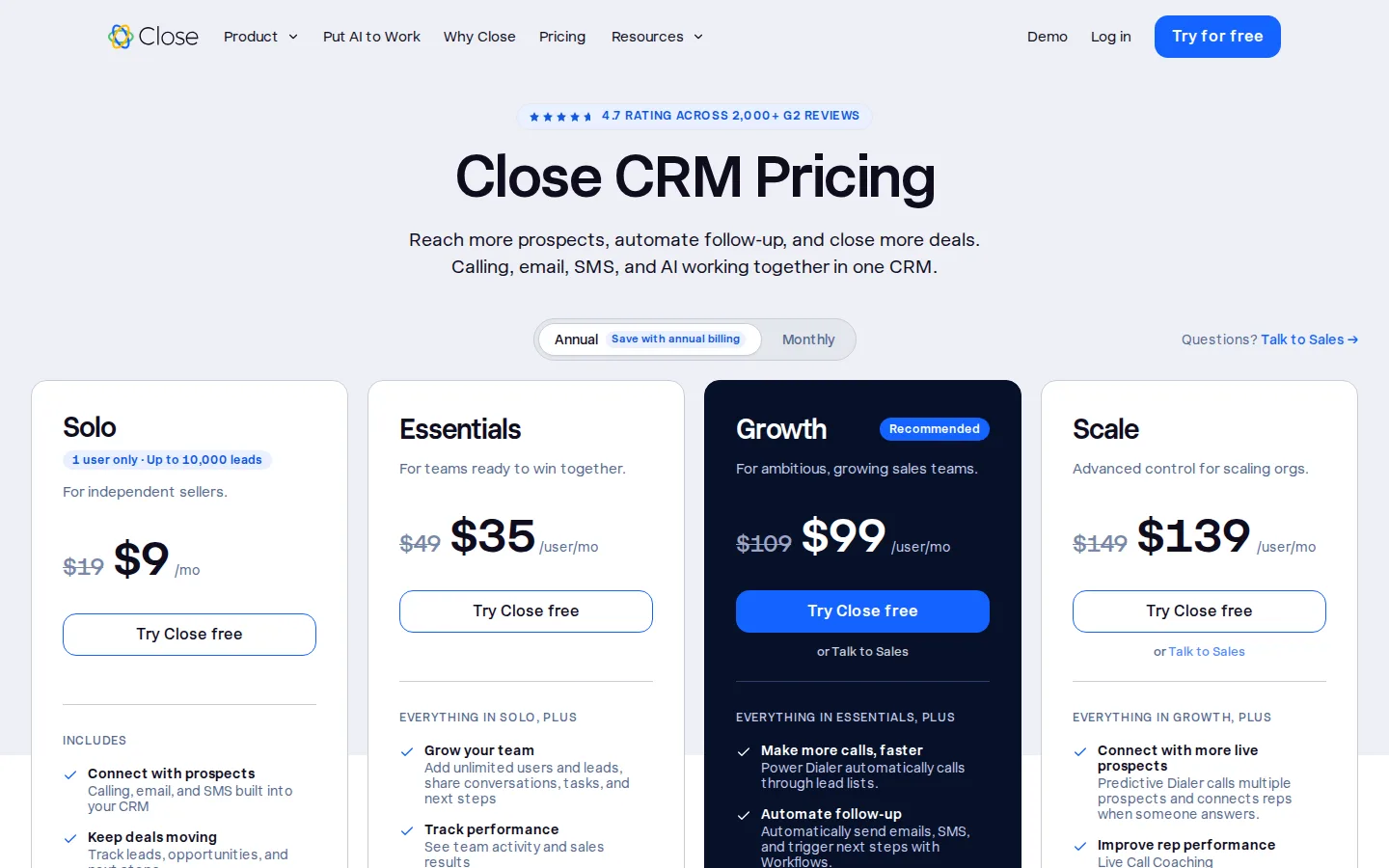
Source: close.com
Scroll the table →
Plan
Monthly Cost
Annual Cost
User Limit
Core Feature Gates
Solo
$19 / user / mo
$9 / user / mo
1 user maximum
Capped at 10,000 leads; excludes automated workflows
Essentials
$49 / user / mo
$35 / user / mo
Unlimited
Unlimited contacts and leads; built-in calling, email, and SMS
Growth
$109 / user / mo
$99 / user / mo
Unlimited
Automated workflows, power dialing, and bulk emailing
Scale
$149 / user / mo
$139 / user / mo
Unlimited
Predictive dialing, role-based access permissions, and coaching
Beyond fixed software subscriptions, Close CRM for outbound sales carries variable telephony charges. Outbound phone calls cost around $0.02 per minute, while virtual phone numbers begin at roughly $1 per month. Solo accounts face a strict ceiling of one seat and 10,000 leads, making Essentials the entry point for growing teams requiring shared pipelines.
Outbound sales teams must evaluate where automation tiers unlock high-volume calling features in this Close CRM review. Automated sequences, power dialing, and bulk email tools require the Growth plan at $99 per user monthly on annual terms. Scaling operations needing predictive dialing and custom role-based permissions must step up to the Scale tier.
Close CRM Pros and Cons
Close suits outbound teams that want calling, messaging, and pipeline tracking consolidated in one place. Moving reps from spreadsheets is straightforward because built-in import tools speed up setup, letting teams onboard within two weeks. However, organizations managing complex client lifecycles will notice strict data limits.
Pros
• Native phone calling, SMS, and email eliminate the need for external dialer tools.
• Built-in spreadsheet importer and data transfer tools streamline migration from other CRMs.
• Full team onboarding and adoption can occur in as little as two weeks.
• Higher plans provide power dialers and automated workflows for high-velocity outreach.
Cons
• It also lacks native proposal generation, quoting features, and marketing automation.
• Solo operators must review baseline limits before buying.
• The Solo plan is restricted to one user and has a cap of 10,000 leads.
• High-volume outbound teams move faster because reps never juggle separate third-party dialers or manual call logging tools.
This Close CRM review finds the platform less effective for post-sale account management. The system relies on a rigid data model limited to leads, contacts, and opportunities, offering no custom objects for account tracking. Teams must also look elsewhere for native proposal creation, quoting tools, and marketing campaigns.
Close fits high-velocity inside sales teams that live in their phone and inbox. Full onboarding can take as little as two weeks because the platform focuses strictly on conversations rather than complex enterprise administration. However, solo operators face a single-seat cap of 10,000 leads on the entry plan.
The verdict
Who should choose Close CRM
Teams needing broader marketing suites or flexible enterprise databases should evaluate Close CRM alternatives like HubSpot or Pipedrive instead. Close relies on a fixed data model of leads, contacts, and opportunities without custom objects. It also lacks built-in proposal generation, quoting tools, and marketing automation.
Frequently Asked Questions
Does Close CRM support built-in calling and SMS?
Yes, Close includes built-in calling and SMS functionality directly within the lead view without requiring third-party plugins. Telephony usage incurs separate charges, with outbound calls billed at around $0.02 per minute and virtual phone numbers starting near $1 per month.
How much does Close CRM cost?
Close CRM pricing depends on your team size and feature requirements across four paid tiers. Solo costs $19 per user monthly or $9 annually, Essentials runs $49 monthly or $35 annually, Growth costs $109 monthly or $99 annually, and Scale costs $149 monthly or $139 annually.
Does Close offer a free trial or money-back guarantee?
Yes, you can test the platform through a 14-day free trial that requires no credit card up front. If you decide to subscribe, the vendor also backs initial purchases with a 30-day money-back guarantee.
For a closer look, read craft for teams review and loom review.
Produced by
ToolNest Editorial
Independent software reviews, comparisons and guides for people who want their tools to feel lighter.
Keep reading
More from the nest.
 Reviews
Read our honest Linear review for small agencies. Discover official pricing, key limits, and whether its focused issue tracking fits your client workflow.
 Reviews
Read our candid Notion review for small teams. Explore verified pricing, core trade-offs, and daily workflow fit to decide if it matches your needs.
 Reviews
Read our Loom review to evaluate pricing, video storage limits, and whether async recordings genuinely cut meeting overload for remote teams.
The ToolNest letter
Better tools, once a week.
One calm email with the reviews, comparisons and tools worth your attention.
Join the newsletter“Less noise. Better tools. A calmer stack.”


